Contact Sheet
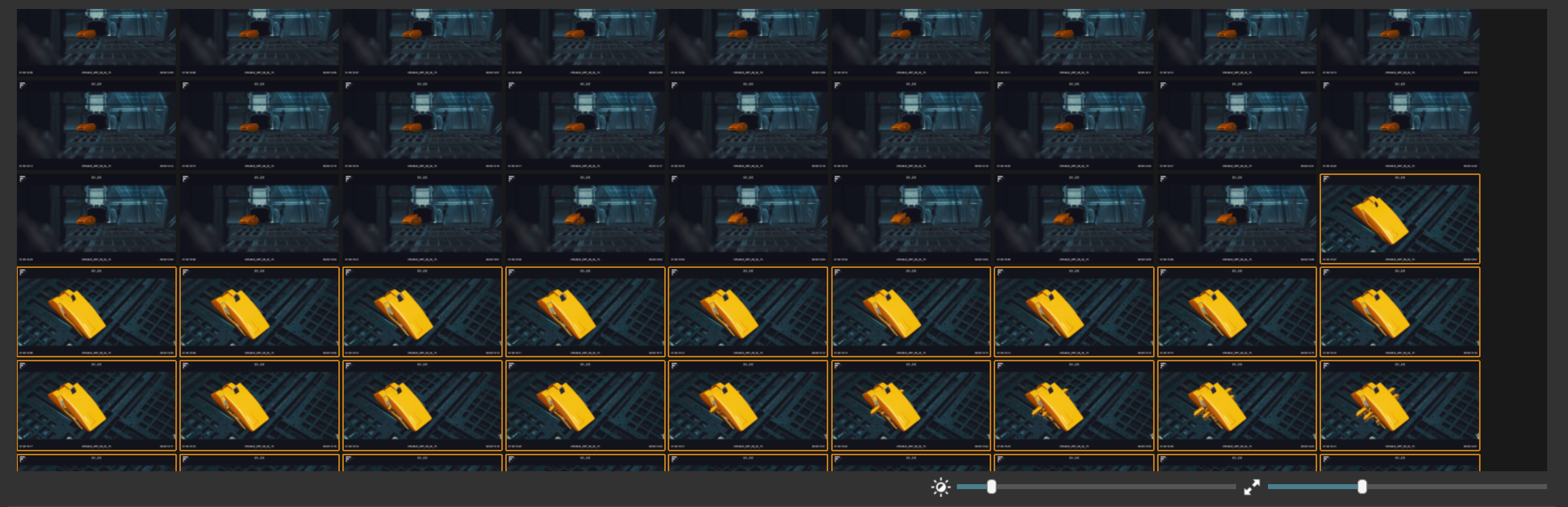
The contact sheet is the best way to find cuts the detector missed. Click Find Missing Cuts (or press `) and every frame of the current shot is laid out in a grid. A missed cut is easy to spot: the picture suddenly changes.
Add a missing cut
- Look through the frames of the shot for the point where a new shot begins.
- Click the first frame of the new shot (or move to it with the arrow keys).
- Press C.
That's it. The cut is added to the Shots Table and stays there, even if you change the threshold later.
Find your way around
- The Spike Graph zooms in to only show the spikes of the current shot, which helps to spot a missed cut inside it.
- A small graph map above the main graph shows where the current shot sits within the whole clip.
- Use the sliders under the sheet to change the brightness and size of the thumbnails. Brighten dark shots, or enlarge the frames to compare details.
Keys for the contact sheet
- Page Up / Page Down move to the previous or next shot.
- Left / Right select the previous or next frame.
- Up / Down select the frame above or below.
- ` switches back to the graph.
The selected frame has an orange outline.